
Reports and dashboard
Pulso Flow gives you a quick look at your studio's status: how many active members you have, what's still pending today, how attendance is going and how your cash flow looks. It helps you make day-to-day decisions without doing the math by hand.
The studio dashboard
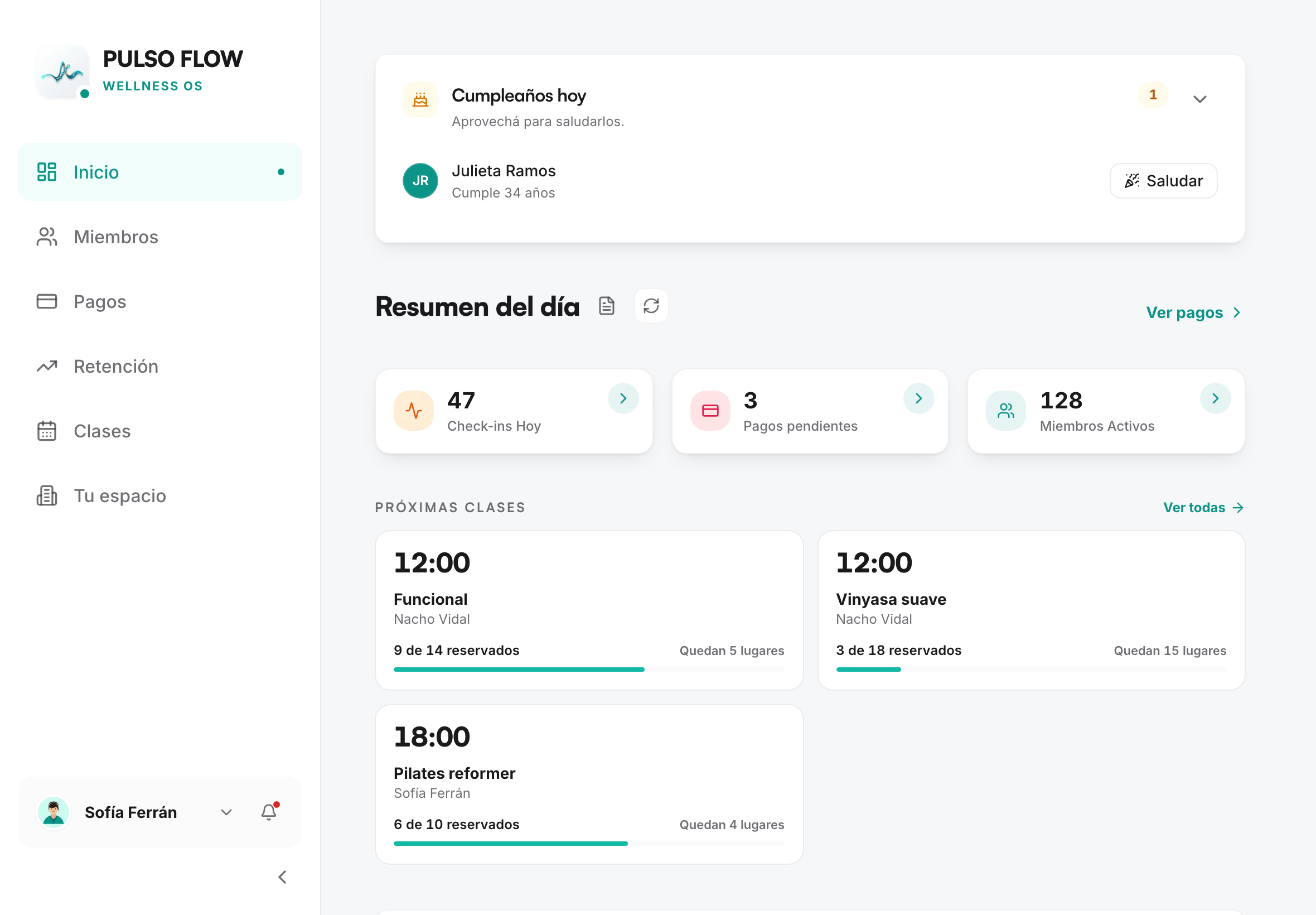
The dashboard summarizes, for your studio (or filtered by location):
- Day summary: the three figures at the top — today's check-ins, payments pending approval and active members. Each one links to its screen.
- Birthdays today, so you can greet them at the desk.
- Today's classes, with each one's bookings (see Classes and bookings).
- Pending check-ins: members waiting for their entry to be approved.
- Turned away at the door: they came today and couldn't get in, with the reason and a shortcut to renew.
- No plan assigned: members who signed up on their own and still have no plan.
- Recent activity at the studio: the latest check-in, payment and membership movements.
Expirations don't live on the dashboard: to see who's about to expire, use the roster's Expiration filter (see Member management).
Some of this information is intended for the owner; staff sees a more limited version (see Team and permissions).
Cash flow: income vs. expenses
The cash flow view lives as a tab inside Payments and shows you how the studio's money is doing over a period. Both the owner and staff use it.
- Income: the sum of your members' approved payments plus the income you record manually (see below).
- Expenses: the sum of the expenses you recorded.
- Net: income minus expenses.
- Breakdown by category of expenses and, if you have several locations, breakdown by location.
You can filter by date range and by location.
Recording income that isn't a membership
Not everything that comes into the studio is a membership. You can record other income by hand so the cash flow view adds up:
- Category: product sale, service or other (with a free-form label).
- Amount, description, date, payment method (cash or transfer) and location (optional).
This income is added to the approved payments in the cash flow total and appears in its own list, where you can edit or delete it.
Recording expenses
For the cash flow view to be accurate, you record your studio's expenses. Each expense has:
- Category: salaries, rent, utilities, equipment, maintenance, supplies, marketing, insurance, taxes or other.
- If you choose other, you can add a free-form label (for example, "Cleaning", "Accountant").
- Amount, description, date and location (optional).
Member tracking
Beyond the numbers, the system helps you not lose sight of people: it detects inactive members and keeps the weekly attendance streak. The details are in Member management.